Support
 Login
Login
Step 1: Login into your server using any SSH client (Like bitwise SSH client) or terminal via the provider.
Step 2: Enter your IP address and login credentials Username, password, and then click on login
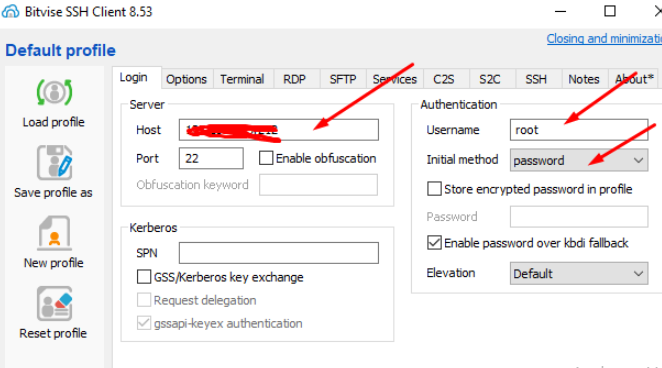
Step 3: When you log in to the Bitwise SSH client open the terminal and run the command.
The following command can be used to upgrade to the latest version.
- sh <(curl https://raw.githubusercontent.com/usmannasir/cyberpanel/stable/preUpgrade.sh || wget -O - https://raw.githubusercontent.com/usmannasir/cyberpanel/stable/preUpgrade.sh)
If using a sudo user rather than root, try this:
- sudo su - -c "sh <(curl https://raw.githubusercontent.com/usmannasir/cyberpanel/stable/preUpgrade.sh || wget -O - https://raw.githubusercontent.com/usmannasir/cyberpanel/stable/preUpgrade.sh)"
How to Upgrade Nexi Panel to a Specific Version
- wget https://raw.githubusercontent.com/usmannasir/cyberpanel/<branch name>/cyberpanel_upgrade.sh
- chmod +xNexi Panel_upgrade.sh
- ./cyberpanel_upgrade.sh
Step 1: Remove old script:
First, you have to remove the old script file to get a new and upgrade. Use the command given below to do this.
- rm -rfNexi Panel_upgrade.sh
Step 2: Download specific branch script:
Now in the next step, you have to download the script for the new branch you want to install using the command stated below.
- wget https://raw.githubusercontent.com/usmannasir/cyberpanel/v<branch>/cyberpanel_upgrade.sh
remove <branch> to your required branch name
Step 3: Give execute Permissions :
using the command stated below gives the upgrade command execution permissions.
- chmod +xNexi Panel_upgrade.sh
do all this in / or root directory and you must log in as root.
Step 4: Run upgrade script:
Now in the last step just run this command and wait when the system asks for the version give the branch version like “2.0.1-dev”
- ./cyberpanel_upgrade.sh
Updates between official versions
Even when there hasn’t been a new version ofNexi Panel officially released, there are always minor updates happening behind the scenes. In order to take advantage of these, you can upgradeNexi Panel at any time